
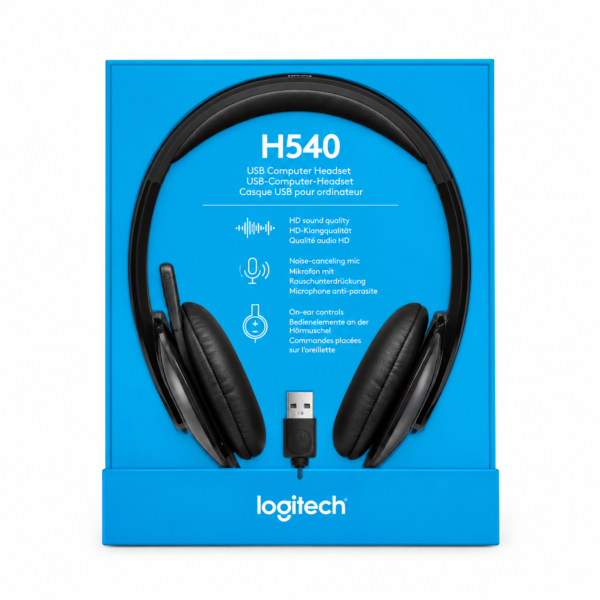
Logitech H540 Headset in Kenya – USB Stereo Headset with Microphone
Looking for a reliable Logitech H540 Headset in Kenya for online meetings, remote work, video calls, online classes, music, gaming, or everyday computer use? The Logitech H540 is a USB stereo headset designed for users who want convenient computer audio together with a dedicated microphone and easy-to-use controls.
The Logitech H540 Headset combines stereo sound, a built-in noise-cancelling microphone, USB connectivity, and convenient on-ear controls in one practical headset. Whether you are working from home, attending virtual meetings, communicating with customers, studying online, watching videos, listening to music, or taking part in voice chats, the H540 provides a versatile audio solution for compatible computers.
Unlike basic analogue headsets, the Logitech H540 connects through USB and is designed to provide digital audio directly through a compatible computer. The headset also includes controls that make it convenient to adjust audio while you are using it.
For professionals, students, freelancers, remote workers, customer service teams, casual gamers, and home users, the H540 can be a useful addition to a computer workstation.
If you are searching for a Logitech H540 Headset in Kenya, Mchoice Investments provides computer accessories for home, office, school, business, and everyday technology needs.
Why Choose the Logitech H540 Headset?
The Logitech H540 is designed for users who need more than basic headphones. It combines stereo audio with a microphone and convenient controls, making it suitable for communication, work, study, and entertainment.
Its USB connection makes it particularly useful for compatible laptops and desktop computers where users prefer USB audio.
The headset is designed around convenience. Instead of using separate headphones, speakers, and a microphone, you can use the H540 as a single audio and communication device.
Whether you spend your day attending virtual meetings or simply want a better computer audio experience, the H540 offers a practical solution.
Stereo Audio for Music, Videos and Communication
The Logitech H540 provides stereo audio for a wide range of applications.
Stereo sound can make listening to music, watching movies, following tutorials, playing games, and attending online meetings more enjoyable.
The headset provides separate left and right audio channels, making it suitable for everyday multimedia and communication.
You can use the H540 for:
- Music
- YouTube videos
- Movies
- Podcasts
- Online tutorials
- Online classes
- Virtual meetings
- Voice calls
- Gaming
- Video conferencing
For users who spend many hours working or entertaining themselves on a computer, having dedicated stereo headphones can be more convenient than relying on built-in speakers.
Noise-Cancelling Microphone for Communication
One of the standout features of the Logitech H540 is its built-in noise-cancelling microphone.
The microphone is designed to help reduce unwanted background noise during voice communication, making it useful in busy home offices, workplaces, study areas, and other environments where surrounding sounds may be present.
This makes the H540 suitable for:
- Online meetings
- Video conferences
- Voice calls
- Remote work
- Online classes
- Virtual interviews
- Customer service
- Online training
- Voice chats
- Business communication
The microphone can be positioned as needed and can be moved out of the way when you are not using it.
For people who regularly communicate through their computers, having a headset with a dedicated microphone can provide a more convenient experience.
Logitech H540 for Online Meetings
Virtual meetings are now part of everyday work for many businesses and professionals.
Whether you are attending a team meeting, speaking with a client, conducting an interview, or participating in online training, the quality and convenience of your computer audio can make a difference to your workflow.
The Logitech H540 combines headphones and microphone functionality, allowing you to listen and communicate using one device.
The noise-cancelling microphone is particularly useful when there are other sounds around you.
For professionals looking for a USB headset for online meetings in Kenya, the Logitech H540 is a practical option for compatible computers and supported communication applications.
Logitech H540 for Remote Work
Remote work often involves long periods of computer-based communication.
You may need to attend multiple meetings, make calls, communicate with clients, participate in training, or collaborate with colleagues online.
The Logitech H540 can form part of a home office setup by providing stereo headphones, a dedicated microphone, and convenient audio controls.
It can be useful for:
- Remote employees
- Freelancers
- Virtual assistants
- Online tutors
- Consultants
- Customer service agents
- Sales professionals
- Digital marketers
- Business owners
The wired USB connection also means you don’t have to worry about charging a wireless battery before an important meeting.
Logitech H540 for Online Classes
Students can use the Logitech H540 for online learning, virtual classes, educational videos, and online discussions.
The stereo headphones allow students to hear lessons and presentations through a personal audio device, while the microphone can be used for participation when supported by the learning platform.
The noise-cancelling microphone can also be useful when studying or attending lessons from environments with background noise.
For students searching for a USB headset for online classes in Kenya, the H540 offers a combination of audio, microphone, and convenient controls.
USB Connectivity for Convenient Computer Use
The Logitech H540 connects to compatible computers through USB.
USB connectivity makes it a practical choice for users who prefer a digital computer audio connection rather than a traditional 3.5mm analogue connection.
The headset can be suitable for compatible:
- Desktop computers
- Laptop computers
- Home office PCs
- Business workstations
- School computers
- Computer labs
Before purchasing, check that your computer has a compatible USB port and supports the headset.
Convenient On-Ear Controls
The Logitech H540 includes convenient controls positioned on the headset, allowing you to manage audio without constantly reaching for your computer.
Depending on the supported functions, headset controls can make it easier to manage volume and other audio functions while working.
This can be particularly useful during meetings, calls, music playback, and other situations where you want quick access to audio controls.
Instead of opening computer settings every time you need to adjust the volume, the on-headset controls provide a more convenient way to manage your listening experience.
Logitech H540 for Voice Calls
The H540 is suitable for compatible voice communication applications.
Whether you are communicating with a colleague, customer, client, friend, or family member, the headset provides headphones for listening and a microphone for speaking.
The built-in noise-cancelling microphone can help make voice communication more convenient in environments where background sounds are present.
This makes the headset suitable for both professional and personal calls.
Logitech H540 for Video Conferencing
Video conferencing requires both reliable audio output and microphone input.
The Logitech H540 combines both functions in one USB headset.
You can use it with compatible conferencing applications to listen to meetings and communicate using the built-in microphone.
For businesses with employees working remotely or from shared offices, a dedicated USB headset can be a useful workstation accessory.
Logitech H540 for Customer Service
Customer service teams often spend many hours communicating with customers through computers.
A dedicated headset can simplify this type of workstation by combining headphones and microphone functionality.
The Logitech H540 can be used with compatible customer communication and call applications.
It can be useful for:
- Customer support
- Call centre work
- Sales teams
- Online support
- Virtual assistants
- Reception teams
- Business communication
The USB connection can also make deployment straightforward on compatible computers.
Logitech H540 for Casual Gaming
The Logitech H540 can also be used for casual gaming on compatible computers.
The stereo headphones provide game audio, while the microphone can be used for voice communication in supported games and applications.
This makes the headset suitable for users who want one device for gaming, work, study, calls, and entertainment.
However, dedicated gaming headsets may include additional gaming-specific features such as specialized sound profiles, RGB lighting, dedicated gaming controls, or other features.
For general gaming and voice communication, the H540 provides a versatile computer headset option.
Logitech H540 for Music and Entertainment
The Logitech H540 is not limited to meetings and calls.
You can use the headset for music, videos, movies, podcasts, online tutorials, and other multimedia content.
The stereo audio provides a personal listening experience that can be useful at home, in an office, or while studying.
If you regularly switch between work and entertainment on your computer, having one headset capable of handling both can simplify your setup.
Logitech H540 for Home Office Setups
A modern home office may include a laptop or desktop computer, monitor, keyboard, mouse, webcam, and headset.
The Logitech H540 can serve as the audio and microphone component of this setup.
It is suitable for professionals who attend virtual meetings, make calls, participate in online training, and collaborate remotely.
The wired design also eliminates the need to recharge a wireless headset.
For users who prefer simple and reliable computer accessories, the H540 can be a useful workstation upgrade.
Logitech H540 for Office Use
The H540 can also be used in traditional office environments.
Employees can use it for virtual meetings, calls, online training, customer communication, and other computer-based activities.
Its microphone and stereo headphones allow employees to manage both listening and speaking through one device.
This can be especially useful in offices where employees regularly participate in virtual meetings with colleagues, customers, suppliers, or partners.
Logitech H540 for Students and Professionals
The versatility of the H540 makes it suitable for both students and professionals.
A student can use it for online classes, research, educational videos, music, and virtual discussions.
A professional can use it for meetings, calls, remote work, presentations, training, and collaboration.
This makes the H540 a general-purpose headset rather than an accessory limited to one particular type of user.
Why Use a Dedicated USB Headset?
Modern laptops and desktop computers often have built-in speakers and microphones, but a dedicated headset can provide a more convenient solution for regular communication.
A USB headset can offer:
- Personal audio
- Dedicated microphone
- Convenient volume controls
- Reduced reliance on built-in speakers
- A more organized communication setup
- Convenient use during meetings
- No wireless battery charging
For users who spend several hours a day on their computers, these advantages can make a headset an important part of their workstation.
Logitech H540 for Work From Home
Working from home requires equipment that can support productivity and communication.
If your work involves virtual meetings, customer calls, team discussions, online training, or remote collaboration, the Logitech H540 can be part of your everyday setup.
The stereo headphones allow you to focus on meeting audio, while the microphone provides voice input.
This can be particularly useful when working from a shared room where external speakers may disturb other people.
Logitech H540 for Small Businesses
Small businesses and entrepreneurs increasingly use online communication for customer service, sales, meetings, and collaboration.
A dedicated USB headset can help create a more professional computer workstation.
The Logitech H540 can be used for supported business communication applications and can be suitable for employees who regularly use computers for voice communication.
Whether you’re setting up one workstation or equipping several employees, the H540 provides a practical combination of audio and microphone functionality.
Logitech H540 for Virtual Interviews
Virtual interviews require reliable communication.
A headset can help candidates listen to interviewers while providing a dedicated microphone for speaking.
The Logitech H540 can be used for compatible video conferencing and communication platforms, making it useful for job interviews, professional consultations, online meetings, and virtual presentations.
A dedicated headset can also be more convenient than relying on laptop speakers and a built-in microphone.
Logitech H540 for Online Business
Online entrepreneurs and digital professionals often communicate with customers and clients remotely.
Whether you run an ecommerce business, digital marketing agency, consulting service, or online support operation, communication is an important part of everyday work.
The Logitech H540 can be used for compatible online communication platforms and provides a combination of headphones and microphone in one device.
It can therefore be a useful accessory for professionals who spend significant time communicating online.
Who Should Buy the Logitech H540?
Remote Workers
Ideal for professionals who regularly attend online meetings and make computer-based calls.
Students
Useful for online classes, educational videos, virtual discussions, and study sessions.
Office Workers
Suitable for virtual meetings, customer communication, training, and calls.
Freelancers
Useful for client calls, interviews, online collaboration, and virtual meetings.
Customer Service Teams
A practical headset option for compatible computer-based communication systems.
Casual Gamers
Suitable for general gaming audio and voice communication.
Home Users
Useful for music, movies, videos, online classes, calls, and general computer entertainment.
Logitech H540 vs Basic Computer Headsets
The Logitech H540 provides more features than a basic headset because it combines USB connectivity, stereo audio, a built-in noise-cancelling microphone, and convenient on-ear controls.
This makes it suitable for users who want a headset that can handle both communication and entertainment.
For simple tasks such as occasional calls, a basic headset may be sufficient. However, users who regularly attend meetings, work remotely, study online, or communicate through their computers may appreciate the additional convenience offered by the H540.
Logitech H540 vs Wireless Headsets
Wireless headsets provide freedom from cables but generally require charging and wireless pairing.
The Logitech H540 uses a wired USB connection instead.
This means you don’t need to monitor a wireless battery level or pair the headset through Bluetooth.
For users who primarily work at a desk and want a reliable wired connection, the H540 can be a practical alternative to wireless headphones.
Buy Logitech H540 Headset in Kenya
Looking for where to buy Logitech H540 Headset in Kenya?
Get the Logitech H540 from Mchoice Investments for your home, office, school, business, or computer workstation.
With stereo audio, a built-in noise-cancelling microphone, USB connectivity, and convenient on-ear controls, the H540 is designed for users who need a versatile headset for communication and entertainment.
Whether you’re attending an online meeting, working remotely, studying online, making a voice call, watching videos, listening to music, or enjoying casual gaming, the Logitech H540 can support a wide range of everyday activities.
Order your Logitech H540 Headset from Mchoice Investments today and upgrade your computer audio and communication setup.
Key Features and Benefits of Logitech H540
- Stereo audio
- Built-in noise-cancelling microphone
- USB connectivity
- Wired headset design
- Convenient on-ear controls
- Suitable for compatible laptops
- Suitable for compatible desktop computers
- Useful for online meetings
- Suitable for remote work
- Useful for online classes
- Suitable for voice calls
- Useful for video conferencing
- Can be used for casual gaming
- Suitable for music and videos
- Useful for home and office setups
- No wireless battery charging required
- Convenient for everyday computer use
Frequently Asked Questions About Logitech H540
What is the Logitech H540 Headset?
The Logitech H540 is a wired USB stereo headset with a built-in noise-cancelling microphone and on-headset controls. It is designed for computer-based communication, entertainment, online meetings, calls, and other everyday activities.
Does the Logitech H540 have a microphone?
Yes. The Logitech H540 has a built-in noise-cancelling microphone designed for voice communication on compatible computers and applications.
Is the Logitech H540 wireless?
No. The Logitech H540 is a wired USB headset.
Does Logitech H540 use USB?
Yes. The H540 connects to compatible computers using USB.
Can I use Logitech H540 on a laptop?
Yes, provided the laptop has a compatible USB port and supports the headset.
Can I use Logitech H540 on a desktop computer?
Yes. The H540 can be used with compatible desktop computers with an available USB port.
Is Logitech H540 suitable for online meetings?
Yes. The headset is suitable for online meetings, video conferences, calls, and other communication activities on compatible computers.
Can students use Logitech H540 for online classes?
Yes. Students can use the headset for online lessons, educational videos, virtual discussions, and other supported learning activities.
Can I use Logitech H540 for gaming?
Yes. The H540 can be used for casual gaming and voice communication on compatible computers and supported games.
Can Logitech H540 be used for music?
Yes. The stereo headset can be used for music, videos, movies, podcasts, tutorials, and other compatible audio content.
Does Logitech H540 have noise cancellation?
The H540 features a noise-cancelling microphone designed to help reduce unwanted background noise during voice communication.
Does Logitech H540 require charging?
No. The Logitech H540 is a wired USB headset and does not require a rechargeable battery for operation.
Is Logitech H540 suitable for remote work?
Yes. The headset is suitable for remote work activities such as virtual meetings, calls, training, and online collaboration.
Where can I buy Logitech H540 in Kenya?
You can buy the Logitech H540 Headset from Mchoice Investments for home, office, school, business, communication, entertainment, and everyday computer use.
Reviews
There are no reviews yet.