
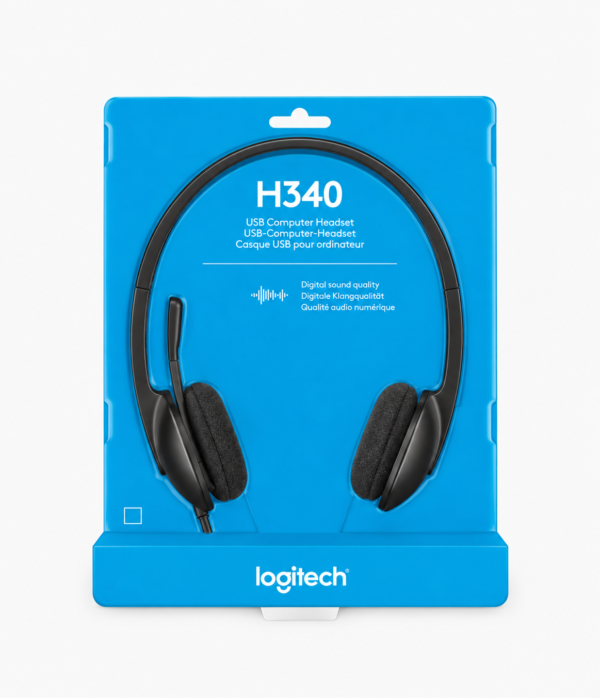
Logitech H340 USB Headset in Kenya – Wired Headset with Microphone
Looking for a reliable Logitech H340 USB Headset in Kenya for online meetings, remote work, online classes, voice calls, gaming, music, or everyday computer use? The Logitech H340 is a practical USB headset designed for users who need convenient audio and voice communication from their computer.
The Logitech H340 USB Headset combines stereo audio with a built-in microphone and a USB connection, giving you a straightforward solution for computer-based communication and entertainment. Whether you are working from home, attending virtual meetings, studying online, communicating with clients, or enjoying videos and music, the H340 can become a useful addition to your computer setup.
Unlike traditional analogue headsets that connect through a 3.5mm audio jack, the H340 uses USB connectivity, making it particularly convenient for compatible computers with USB ports. Its plug-and-play design allows you to connect the headset and start using it without the need for complicated installation.
For professionals, students, freelancers, customer service teams, casual gamers, and home users, the Logitech H340 offers a practical combination of headphones and microphone in one device.
If you are searching for a Logitech H340 USB Headset in Kenya, Mchoice Investments provides computer accessories suitable for home, office, school, business, and everyday technology needs.
Why Choose the Logitech H340 USB Headset?
The Logitech H340 is designed for users who want a simple and convenient USB headset for communication and entertainment.
It combines stereo headphones with a built-in microphone, allowing you to listen and communicate through one device. The USB connection also provides a straightforward way to connect the headset to a compatible computer.
For someone who regularly attends online meetings, makes voice calls, participates in virtual classes, or works with communication applications, having a dedicated USB headset can make everyday computer use more convenient.
USB Connectivity for Convenient Computer Use
One of the defining features of the Logitech H340 is its USB connection.
Instead of using a traditional 3.5mm analogue audio connection, the H340 connects to a compatible computer through USB.
This makes it a useful option for computers where users prefer USB audio or where the available audio ports do not provide the connection they need.
Simply connect the headset to a compatible USB port and use it with supported operating systems and applications.
The USB design is particularly useful for:
- Desktop computers
- Laptops with USB ports
- Office workstations
- Home office setups
- Computer labs
- Customer service workstations
- Online learning setups
Stereo Audio for Work and Entertainment
The Logitech H340 provides stereo audio for everyday listening.
You can use the headset to listen to music, watch videos, attend virtual meetings, follow online classes, listen to tutorials, make calls, and enjoy other compatible audio content.
Stereo headphones provide separate left and right audio channels, making them suitable for general multimedia and communication.
Using a headset also gives you a personal listening experience, which can be useful when working or studying in shared environments.
Whether you are listening to a business presentation or watching an online tutorial, the H340 allows you to hear audio through the headset rather than relying entirely on external computer speakers.
Built-In Microphone for Voice Communication
The Logitech H340 features a built-in microphone designed for voice communication.
This makes it suitable for users who need both audio output and microphone input from the same device.
The microphone can be used for supported applications involving:
- Online meetings
- Video conferencing
- Voice calls
- Online classes
- Remote work
- Customer service
- Virtual interviews
- Voice chats
- Online training
- Casual gaming
Having an integrated microphone eliminates the need to purchase a separate microphone for basic communication tasks.
Logitech H340 for Online Meetings
Online meetings have become an important part of modern work and business communication.
Whether you are working remotely, attending a virtual interview, joining a team meeting, speaking with a client, or participating in online training, a reliable headset can make communication easier.
The Logitech H340 allows you to listen through the stereo headphones while using the built-in microphone for voice communication on compatible platforms.
The headset can be used with supported communication and conferencing applications, depending on the computer and software configuration.
For professionals searching for a USB headset for online meetings in Kenya, the H340 is a practical option.
Logitech H340 for Remote Work
Remote workers often rely heavily on laptops and desktop computers for meetings, calls, collaboration, training, and communication.
A dedicated USB headset can be an important accessory in a home office setup.
The Logitech H340 provides both headphones and a microphone, allowing you to handle audio communication without needing separate devices.
It can be useful for:
- Remote employees
- Freelancers
- Virtual assistants
- Online tutors
- Consultants
- Customer support agents
- Sales professionals
- Digital marketers
- Small business owners
The wired USB design also means you don’t need to worry about charging a wireless headset before a meeting.
Logitech H340 for Online Classes
Students can use the Logitech H340 for online classes, virtual lessons, educational videos, and online discussions.
The stereo headphones allow students to hear teachers, presentations, videos, and other learning materials through a personal audio device.
The built-in microphone can also be used when students need to participate in virtual discussions or communicate with instructors through supported applications.
For students searching for a USB headset for online classes in Kenya, the Logitech H340 provides a practical computer audio solution.
It can be particularly useful for students using desktop computers or laptops with compatible USB ports.
Logitech H340 for Laptop and Desktop Computers
The Logitech H340 is designed primarily for computer use and connects through USB.
This makes it suitable for compatible:
- Laptop computers
- Desktop computers
- Office PCs
- Home computers
- School computers
- Workstations
If your computer has a compatible USB port, the headset can provide an easy way to add dedicated audio and microphone functionality.
Always check your specific device’s available ports and compatibility before purchasing.
Plug-and-Play Convenience
One of the benefits of a USB headset is the straightforward connection.
The Logitech H340 is designed to provide convenient computer audio without requiring a complicated setup.
Connect the USB cable to a compatible computer and configure the audio device through your operating system or application if necessary.
This makes it suitable for users who want a simple headset without dealing with Bluetooth pairing or wireless battery management.
Logitech H340 for Voice Calls
The Logitech H340 can be used for compatible voice communication applications.
Whether you are calling a colleague, speaking with a customer, communicating with a client, or talking with friends and family online, the headset provides both headphones and microphone functionality.
The headphones allow you to listen to conversations privately, while the microphone handles voice input.
This makes the H340 suitable for both professional and personal communication.
Logitech H340 for Video Conferencing
Video conferencing often requires dependable audio equipment.
A headset can help users manage both listening and speaking during virtual conferences.
The Logitech H340 can be used with compatible video conferencing applications, allowing you to use the headset’s headphones and microphone for communication.
For businesses and professionals conducting frequent virtual meetings, a USB headset can be a convenient addition to each workstation.
Logitech H340 for Customer Service
Customer service and support teams frequently use computers for communication.
A headset with a microphone can help simplify these workstations by combining audio output and microphone input in one device.
The Logitech H340 can be used for compatible customer communication applications where USB headsets are supported.
It can be useful for:
- Customer support
- Call centre work
- Sales teams
- Reception desks
- Virtual assistants
- Online support teams
For organizations purchasing computer accessories for multiple workstations, USB headsets can provide a straightforward connection option.
Logitech H340 for Casual Gaming
The Logitech H340 can also be used for casual gaming on compatible computers.
The stereo headphones provide game audio, while the microphone can support voice communication in compatible games and applications.
This makes the H340 useful for users who want a headset that can handle gaming alongside work, study, meetings, and entertainment.
However, dedicated gaming headsets may provide additional gaming-focused features such as specialized controls, gaming audio profiles, RGB lighting, or other features.
For general computer gaming and voice communication, the H340 provides a practical alternative.
Logitech H340 for Music and Videos
The H340 is not limited to communication.
You can also use it to listen to music, watch YouTube videos, follow tutorials, watch movies, listen to podcasts, and enjoy other compatible multimedia content.
The stereo design makes it suitable for everyday entertainment.
For people who regularly use their computers for both work and entertainment, the H340 can serve as a general-purpose headset.
A Practical Headset for Home and Office
The Logitech H340 can be used in different environments.
Home
Use it for remote work, online classes, video calls, music, videos, and internet communication.
Office
Use it for virtual meetings, customer communication, online training, and computer-based work.
School
Students can use it for online learning, virtual classes, educational videos, and discussions.
Business
Businesses can use USB headsets for communication, customer support, meetings, and employee workstations.
Its versatility makes it suitable for a wide range of everyday computer users.
Logitech H340 for Professionals
Professionals who regularly use computers for communication can benefit from having a dedicated headset.
If your work involves virtual meetings, online calls, training, presentations, or remote collaboration, the Logitech H340 provides headphones and a microphone in one device.
It is particularly useful for people who prefer a wired USB connection instead of Bluetooth.
For remote workers and office professionals, a reliable headset can become an essential part of the daily workstation.
Logitech H340 for Students
Students often use computers for a combination of learning and entertainment.
The Logitech H340 can be used for:
- Online classes
- Educational videos
- Virtual discussions
- Voice calls
- Online research
- Music
- Movies
- Casual gaming
Its USB connection makes it particularly useful for compatible computers that support USB audio.
Why Choose a USB Headset?
USB headsets offer an alternative to traditional 3.5mm analogue headsets and wireless Bluetooth models.
A USB headset can be convenient because it uses a digital connection to the computer and does not require a separate wireless battery.
For users who spend long periods on calls or meetings, not having to recharge the headset can be a practical advantage.
The H340 therefore provides a simple option for people who prefer wired USB connectivity.
Logitech H340 for Work From Home
A productive home office often depends on having the right accessories.
Alongside your laptop or desktop computer, keyboard, mouse, webcam, and internet connection, a headset can help with online communication.
The Logitech H340 can provide a dedicated microphone and headphones for virtual meetings, calls, training sessions, and online collaboration.
It can be especially useful when you need to work from a shared room or environment where external speakers may be inconvenient.
Logitech H340 for Online Business
Small business owners, entrepreneurs, freelancers, and online professionals often communicate with customers and clients remotely.
A USB headset can make online communication easier by combining the microphone and headphones into one accessory.
The Logitech H340 can be used for supported business communication applications, virtual meetings, customer conversations, and online collaboration.
For a growing business, having dependable communication accessories can help create a more organized computer workstation.
Who Should Buy the Logitech H340?
The Logitech H340 is suitable for a wide range of users.
Remote Workers
Ideal for online meetings, virtual collaboration, calls, and work-from-home communication.
Students
Useful for online classes, educational videos, virtual discussions, and study sessions.
Office Professionals
Suitable for video conferences, calls, online training, and computer-based communication.
Freelancers
Useful for client meetings, interviews, online collaboration, and internet calls.
Customer Service Teams
Can be used with compatible computer-based communication systems.
Casual Gamers
Suitable for everyday gaming audio and voice communication on compatible computers.
Home Users
Useful for music, videos, calls, online learning, and general computer entertainment.
Logitech H340 vs 3.5mm Headsets
One important difference between the Logitech H340 and traditional analogue headsets is the connection method.
The H340 uses USB connectivity, while many conventional computer headsets use a 3.5mm audio jack.
A USB headset can be useful if you prefer USB audio or your computer setup makes USB connectivity more convenient.
The choice ultimately depends on your computer’s available ports, compatibility requirements, and personal preference.
Logitech H340 vs Wireless Headsets
Wireless headsets can provide freedom from cables, but they generally require battery charging and wireless pairing.
The Logitech H340 uses a wired USB connection instead.
This means you don’t need to recharge the headset before use, and there is no Bluetooth pairing process to manage.
For office workers, students, and other users who remain close to their computers, a wired USB headset can be a practical choice.
Buy Logitech H340 USB Headset in Kenya
Looking for where to buy Logitech H340 USB Headset in Kenya?
Get the Logitech H340 from Mchoice Investments for your home, office, school, business, or personal computer setup.
With stereo audio, a built-in microphone, and USB connectivity, the H340 is suitable for online meetings, remote work, online classes, voice calls, videos, music, and casual gaming.
Whether you are setting up a home office, upgrading your computer accessories, equipping a workstation, or looking for a headset for online learning, the Logitech H340 provides a convenient wired audio solution.
Order your Logitech H340 USB Headset from Mchoice Investments today.
Key Benefits of Logitech H340 USB Headset
- Stereo audio
- Built-in microphone
- USB connectivity
- Wired headset design
- Suitable for compatible laptops
- Suitable for compatible desktop computers
- Useful for online meetings
- Suitable for remote work
- Useful for online classes
- Suitable for voice calls
- Useful for video conferencing
- Can be used for casual gaming
- Suitable for music and videos
- Practical for home and office use
- No wireless battery charging required
- Convenient plug-and-play style connection
Frequently Asked Questions About Logitech H340
What is the Logitech H340 USB Headset?
The Logitech H340 is a wired USB stereo headset with a built-in microphone designed for computer-based audio and voice communication.
Does Logitech H340 have a microphone?
Yes. The Logitech H340 features a built-in microphone for voice communication on compatible computers and supported applications.
Is Logitech H340 wireless?
No. The Logitech H340 is a wired USB headset and connects directly to a compatible computer through USB.
Does Logitech H340 use a 3.5mm jack?
No. The Logitech H340 is designed to connect through USB rather than a traditional 3.5mm audio jack.
Can I use Logitech H340 on a laptop?
Yes, provided the laptop has a compatible USB port and supports the headset.
Can I use Logitech H340 on a desktop computer?
Yes. The H340 is suitable for compatible desktop computers with an available USB port.
Is Logitech H340 good for online meetings?
Yes. The H340 can be used for online meetings and video conferencing on compatible computers and supported applications.
Can I use Logitech H340 for online classes?
Yes. Students can use the headset for online classes, educational videos, virtual discussions, and other compatible learning applications.
Can I use Logitech H340 for gaming?
Yes. The H340 can be used for casual gaming and voice communication on compatible computers and supported games.
Can Logitech H340 be used for music?
Yes. The stereo headphones can be used to listen to music, videos, podcasts, tutorials, and other compatible audio content.
Is Logitech H340 suitable for remote work?
Yes. The headset is suitable for remote work activities such as online meetings, calls, virtual training, and computer-based communication.
Does Logitech H340 need to be charged?
The Logitech H340 is a wired USB headset, so it does not require a rechargeable battery for operation.
Where can I buy Logitech H340 in Kenya?
You can buy the Logitech H340 USB Headset from Mchoice Investments for home, office, school, business, communication, entertainment, and everyday computer use.
Reviews
There are no reviews yet.