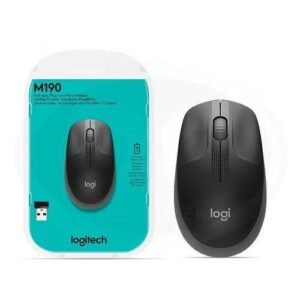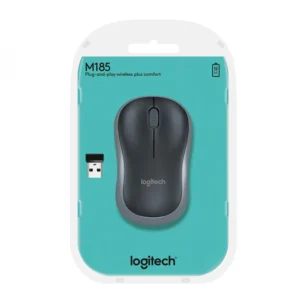
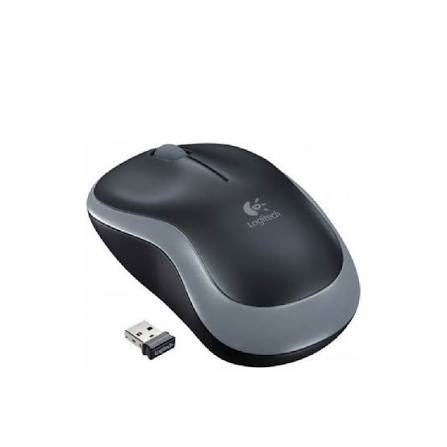
Logitech M175 Wireless Mouse in Kenya
Logitech M175 Wireless Mouse – Simple, Reliable and Convenient
Looking for an affordable, reliable mouse for your laptop or desktop computer? The Logitech M175 wireless mouse is a practical computer accessory designed for everyday work, study, browsing and home computing. Available to check at Mchoice Investments, this compact wireless mouse combines straightforward operation, a comfortable contoured shape and dependable 2.4 GHz wireless connectivity.
Whether you work in an office, study at home, manage a small business or need a convenient mouse for your laptop, the Logitech M175 makes everyday computer navigation easier. Its wireless design helps reduce cable clutter, while the small USB nano receiver provides a simple connection to compatible computers.
Unlike complicated gaming mice with numerous programmable buttons, the Logitech M175 focuses on the features most people use daily: left-clicking, right-clicking, scrolling and selecting items on the screen. It is designed for users who want a simple mouse that is easy to set up and convenient to use.
If you are shopping for a Logitech M175 wireless mouse in Kenya, Mchoice Investments is a place to check for availability and current pricing. Before ordering, confirm the product variant, included accessories, warranty and delivery arrangements with the store.
Why Choose the Logitech M175 Wireless Mouse?
The mouse is one of the most frequently used computer accessories. You may use it to open applications, prepare documents, browse websites, update spreadsheets, manage business records or complete school assignments. A dependable mouse makes these everyday activities more convenient.
The Logitech M175 is designed around simplicity. It offers wireless operation without requiring Bluetooth pairing, a familiar button layout and a small receiver that can remain connected to your computer while you work.
1. Convenient 2.4 GHz Wireless Connectivity
One of the main advantages of the Logitech M175 is its wireless connection. Traditional wired mice have a cable that can get tangled with chargers, keyboard cables and other accessories on your desk. The M175 removes that cable from your immediate workspace.
The mouse communicates with a compatible computer through its USB nano receiver using Logitech’s 2.4 GHz wireless technology. This gives you the convenience of wireless operation while maintaining a straightforward setup process.
The advertised wireless range is up to approximately 10 metres under suitable conditions, although actual performance depends on the environment and possible interference.
This wireless design is useful for office desks, home workstations and laptop setups where you want to keep your workspace organised. It also makes the mouse convenient for people who move their laptops between different locations.
Please note that the Logitech M175 uses a USB receiver rather than Bluetooth. Your computer needs a compatible USB-A port, or an appropriate adapter if it has only USB-C ports.
2. Simple Plug-and-Play Setup
You do not need to be a computer expert to set up the Logitech M175. Its straightforward design allows you to connect the receiver, switch on the mouse and begin using it on a compatible computer.
This makes it useful for students, office workers, home users and businesses purchasing accessories for several workstations.
For basic mouse functions, the M175 generally does not require a separate driver installation on compatible operating systems. This reduces setup complexity and helps users get started quickly.
The USB receiver is small enough to remain plugged into a laptop during normal use. When transporting the mouse, you can store the receiver in its designated storage compartment, where available, to reduce the risk of losing it.
For additional assistance, consult the official <a href=”https://support.logi.com/hc/en-001/articles/360024157094-Getting-started-Wireless-Mouse-M175“>Logitech M175 setup and support page</a>.
3. Comfortable, Contoured Shape
A mouse should feel comfortable enough for everyday computer tasks. The Logitech M175 has a contoured shape designed to fit naturally in your hand, providing a familiar feel for routine navigation.
Its compact size makes it convenient for many laptop and desktop setups without taking up much space on your desk or in your laptop bag.
You can use it to navigate applications, select files, work on assignments, respond to emails and browse the internet. Its simple design also makes it suitable for shared office computers where different people may use the same workstation.
Comfort depends on your hand size and preferred grip. If you have particularly large hands or spend many hours working with a mouse, consider the dimensions carefully before buying.
For everyday computing, however, the M175 offers a straightforward alternative to using a laptop touchpad or a traditional wired mouse.
4. Optical Tracking for Everyday Tasks
The Logitech M175 uses optical tracking to detect movement and control the cursor on your screen. This is useful for navigating websites, selecting text, opening folders and working with ordinary productivity applications.
Its optical tracking is designed for general-purpose computing rather than specialised competitive gaming. For routine work, school assignments and home use, a simple optical mouse can provide the control most users need.
For better results, place the mouse on a clean, suitable surface. A mouse pad or an even desk surface can help provide consistent movement.
If your work involves detailed graphic design, professional image editing or competitive gaming, you may prefer a specialist mouse with adjustable sensitivity and additional controls. The M175 is better suited to users who prioritise simplicity and convenience.
5. Familiar Buttons and Scroll Wheel
The Logitech M175 has the basic controls needed for everyday computer use.
Its left and right buttons support standard selection and context-menu functions. The scroll wheel helps you move through web pages, documents and other content without repeatedly dragging the scrollbar.
Pressing the wheel can also provide a middle-click function, depending on the application.
These familiar controls make the M175 easy to learn, even for people who are not experienced computer users. Whether you are opening files, browsing online stores, working with spreadsheets or reading digital documents, the mouse offers a practical control layout.
The M175 does not focus on extra programmable buttons or advanced gaming features. Instead, it provides a simple interface suitable for everyday productivity.
6. Battery-Powered Convenience
The Logitech M175 uses one AA battery, allowing it to operate without a charging cable. Logitech’s product materials advertise battery life of up to approximately one year, depending on usage and computing conditions.
Actual battery life can vary according to how frequently you use the mouse and other environmental factors. When the battery runs out, you can replace it with a compatible AA battery.
The mouse also includes an on/off switch and power-saving behaviour to help conserve battery power when it is not being used.
This arrangement may appeal to users who prefer a simple wireless accessory that does not need to be recharged regularly. Remember that the M175 is battery-powered rather than an internally rechargeable mouse.
Logitech M175 Wireless Mouse Specifications
Before purchasing a computer accessory, it is useful to review its main specifications. The following table summarises the commonly listed Logitech M175 features. Confirm the exact model and packaging with Mchoice Investments before ordering.
| Feature | Specification |
|---|---|
| Brand | Logitech |
| Model | M175 |
| Product type | Wireless optical mouse |
| Connectivity | 2.4 GHz wireless |
| Receiver | USB nano receiver |
| Bluetooth | Not supported |
| Tracking technology | Optical |
| Controls | Left button, right button and scroll-wheel button |
| Scrolling | Scroll wheel |
| Battery type | 1 × AA |
| Advertised battery life | Up to approximately 1 year |
| Advertised wireless range | Up to approximately 10 metres |
| Power control | On/off switch |
| Setup | Plug-and-play on compatible systems |
| Primary uses | Office work, study, browsing and everyday computing |
| Product colour | Confirm available variant with the seller |
Specifications may differ by regional package or product revision. Check the exact item you are purchasing, especially if you require a particular colour or warranty arrangement.
Who Should Buy the Logitech M175 Wireless Mouse?
The Logitech M175 is intended for people who want a straightforward wireless mouse for common computing tasks. Its compact design and simple controls make it useful in several environments.
Office Workers and Professionals
Office employees regularly use computers for email, spreadsheets, reports, presentations and business applications. A mouse that is easy to connect and use can help make these tasks more convenient.
The Logitech M175 provides the essential controls for daily office work without unnecessary complexity. Its wireless connection also helps reduce cable clutter around the workstation.
It can be considered for administrative desks, reception areas, general office computers and home offices.
Students and Online Learners
Students often use laptops to research assignments, prepare presentations, attend online classes and access learning platforms. A separate mouse can make these activities more comfortable than relying exclusively on a touchpad.
The M175’s simple setup is useful for students who want to connect an accessory and start working without complicated configuration.
Its compact form also makes it convenient for carrying with a laptop, provided the USB receiver is stored safely.
Small Businesses and Organisations
Businesses need practical accessories that employees can use with minimal setup. The Logitech M175 may be suitable for general-purpose workstations, reception computers and other standard office environments.
If you are purchasing multiple mice for your organisation, contact Mchoice Investments to confirm the available quantity, current pricing and any applicable bulk-order arrangements.
Before purchasing for a business, check that the mouse is compatible with the computers where it will be used.
Home Users
A home computer can be used for internet browsing, online shopping, communication, entertainment and personal administration. The Logitech M175 provides a simple way to control these activities without adding another cable to your desk.
It is an option for people who want a practical mouse for everyday use rather than a specialised device with extra features.
Remote Workers and Freelancers
Remote workers often move between documents, browser tabs, email applications and online collaboration tools. A wireless mouse can help keep a home workstation organised while providing convenient cursor control.
The M175 is worth considering if you want a simple, portable accessory for a compatible laptop or desktop computer.
Logitech M175 vs a Wired Mouse
Both wired and wireless mice can handle everyday computer tasks, but they offer different conveniences.
A wired mouse connects directly to your computer. It does not require a separate battery and can be suitable for users who prefer a permanently connected accessory.
The Logitech M175 offers wireless operation, helping reduce cable clutter and giving you more freedom to position the mouse around your workspace.
However, the M175 requires a compatible USB port for its receiver and an AA battery for power. You must also keep the receiver safe when transporting the mouse.
Choose the M175 if wireless convenience and a tidier workspace are important to you. A wired mouse may be a better option if you prefer not to manage batteries or wireless receivers.
Logitech M175 vs a Bluetooth Mouse
A Bluetooth mouse connects through a computer’s Bluetooth functionality, so it generally does not need a separate USB receiver. This can be useful for laptops with limited USB ports.
The Logitech M175 uses a dedicated USB nano receiver instead. This provides a straightforward connection method, but your computer must have a compatible USB port or an appropriate adapter.
Before buying, consider the ports available on your computer. If your laptop has only USB-C ports, you may need a USB-C-to-USB-A adapter or hub to connect the M175 receiver.
Neither connection method is automatically best for everyone. The right choice depends on your device, available ports and preferred setup.
How to Set Up the Logitech M175 Wireless Mouse
Getting started with the Logitech M175 is straightforward.
Step 1: Check the package. Confirm that the mouse, USB receiver and expected battery or accessories are included.
Step 2: Insert the battery. Open the battery compartment and ensure the AA battery is installed in the correct orientation.
Step 3: Locate the receiver. Remove the USB nano receiver from its storage compartment if it is stored inside the mouse.
Step 4: Connect the receiver. Insert it into an available USB-A port on your compatible laptop or desktop computer.
Step 5: Switch on the mouse. Move the on/off switch to the operating position.
Step 6: Test the cursor. Move the mouse across a suitable surface and check that the cursor responds.
Step 7: Start working. Use the left and right buttons and scroll wheel to navigate your computer.
If the mouse does not work, check that the battery is installed correctly and the power switch is on. Make sure the receiver is firmly connected and try another USB port if necessary.
For further help, refer to the official <a href=”https://www.logitech.com/assets/43108/m175-quickstart-guides.pdf“>Logitech M175 quick-start guide</a>.
Tips for Getting the Best from Your Logitech M175
A few simple habits can help you get the most from your mouse.
Use a suitable surface. An even, clean desk or mouse pad can help provide consistent optical tracking.
Switch it off when appropriate. Use the power switch when you will not need the mouse for an extended period.
Store the receiver safely. The nano receiver is small, so use its storage compartment where available when carrying the mouse.
Replace the battery when necessary. If the cursor stops responding or movement becomes unreliable, check the battery before assuming the mouse is damaged.
Keep the mouse clean. Wipe its exterior with a soft, dry cloth. Avoid pouring liquids onto the device or using harsh cleaning chemicals.
Check the USB connection. If the mouse disconnects intermittently, try a different USB port and check whether nearby devices or interference may be affecting the connection.
Position your workstation comfortably. Keep the mouse near your keyboard and avoid repeatedly reaching across your desk. A suitable chair, desk height and relaxed arm position can make long computer sessions more comfortable.
These small steps help maintain a convenient and organised workspace.
Why Shop for the Logitech M175 at Mchoice Investments?
Mchoice Investments offers technology products and computer accessories for customers looking for practical solutions for work, study and home use.
If you are searching for a Logitech M175 wireless mouse in Kenya, visit the <a href=”https://mchoice.co.ke/“>Mchoice Investments website</a> to check current product listings and availability.
You can also explore the store’s computer accessories and other technology products to find items that complement your workstation. Before ordering, confirm the current price, available colour, stock status, warranty and delivery options directly with the seller.
When shopping online, check the product description carefully to ensure the model matches your requirements. If you are buying for an office or purchasing several units, confirm quantities and delivery arrangements before completing your order.
A suitable mouse can make everyday computer use more convenient without requiring a complicated setup. The Logitech M175 is worth considering if your priority is a simple wireless mouse for general-purpose computing.
Frequently Asked Questions About the Logitech M175 Wireless Mouse
1. Is the Logitech M175 a wireless mouse?
Yes. The Logitech M175 uses 2.4 GHz wireless technology and a USB nano receiver to connect to a compatible computer.
2. Does the Logitech M175 support Bluetooth?
No. The M175 connects through its USB wireless receiver rather than Bluetooth. A compatible USB-A port or suitable adapter is required.
3. How long does the Logitech M175 battery last?
Logitech’s product materials advertise up to approximately one year of battery life. Actual performance varies according to usage and computing conditions.
4. Which battery does the Logitech M175 use?
The M175 uses one AA battery. Check the product packaging or seller’s listing to confirm whether a battery is included with your particular purchase.
5. Can I use the Logitech M175 with a laptop?
Yes. You can use it with a compatible laptop that has an available USB-A port for the nano receiver. A suitable adapter may be needed if the laptop has only USB-C ports.
6. Can I use the Logitech M175 with a desktop computer?
Yes. It can be used with a compatible desktop computer that has a suitable USB port and supported operating system.
7. Is the Logitech M175 rechargeable?
No. It uses a replaceable AA battery rather than an internal rechargeable battery.
8. Is the Logitech M175 suitable for office work?
Yes. Its wireless connection, optical tracking, scroll wheel and standard buttons make it suitable for everyday office tasks such as email, browsing, document editing and spreadsheets.
9. Is the Logitech M175 good for gaming?
The M175 can handle basic computer navigation and casual games. However, it is not a specialist gaming mouse and does not offer the advanced features that some competitive gamers need.
10. Where can I buy the Logitech M175 wireless mouse in Kenya?
Check the <a href=”https://mchoice.co.ke/“>Mchoice Investments online store</a> for current availability and pricing. Contact the store to confirm the exact product variant, warranty and delivery arrangements before ordering.
Buy the Logitech M175 Wireless Mouse from Mchoice Investments
Make everyday computing more convenient with the Logitech M175 wireless mouse. Its 2.4 GHz wireless connection, simple USB receiver setup, optical tracking and familiar button layout make it a practical option for students, professionals, home users and small businesses.
If you need a straightforward wireless mouse for browsing, office work or everyday laptop use, the Logitech M175 deserves consideration.
Ready to order? Visit <a href=”https://mchoice.co.ke/“>Mchoice Investments</a> to check the current listing, confirm availability and find out the latest price.
Choose a computer accessory that fits your everyday needs and helps keep your workstation organised and easy to use.