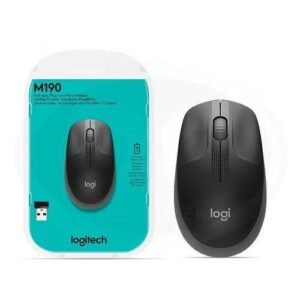

Logitech M185 Wireless Mouse – Reliable Wireless Performance for Everyday Computing
Looking for a reliable, comfortable and affordable mouse for your laptop or desktop computer? The Logitech M185 Wireless Mouse is a practical choice for students, professionals, business owners and anyone who wants convenient computer navigation without the restrictions of a wired mouse. Available through Mchoice Investments, this compact wireless mouse is designed to make everyday computing easier, whether you are working in an office, studying at home or travelling with your laptop.
With its dependable 2.4 GHz wireless connection, smooth optical tracking, convenient USB nano receiver and impressive battery efficiency, the Logitech M185 combines essential functionality with a simple, user-friendly design. It is ideal for handling everyday tasks such as browsing websites, editing documents, preparing spreadsheets, attending online meetings and managing business applications.
For customers in Kenya looking to improve their computer setup without investing in unnecessary extras, this mouse offers a straightforward solution. Its compact design saves desk space, while the wireless connection helps maintain a neat and organised workspace.
Whether you need a dependable mouse for your office workstation, a portable accessory for your laptop or an additional mouse for your business computers, the Logitech M185 is worth considering. Explore the product at Mchoice Investments and choose a practical accessory for your everyday computing needs.
Why Choose the Logitech M185 Wireless Mouse?
A good computer mouse should be comfortable, responsive and easy to use. It should also connect reliably to your computer without requiring complicated installation. The Logitech M185 is designed around these essential requirements, making it suitable for users who prefer simplicity and dependable everyday performance.
Unlike a traditional wired mouse, the M185 communicates with your computer through a small USB receiver. This eliminates the mouse cable and gives you more freedom to arrange your workspace according to your preferences.
The mouse is also designed to be portable. Its compact body fits conveniently into a laptop bag, making it useful for people who regularly move between home, the office, school and client locations.
Here are some of the key benefits that make the Logitech M185 a practical addition to your computer accessories.
1. Reliable 2.4 GHz Wireless Connectivity
The Logitech M185 uses 2.4 GHz wireless technology to communicate with your computer through its USB nano receiver. This connection provides convenient control without requiring a physical cable between the mouse and the computer.
With a wireless operating range of up to 10 metres under suitable conditions, you can operate your computer comfortably without sitting immediately beside it. This is particularly useful in offices, meeting rooms, classrooms and home workspaces where some flexibility in positioning is desirable.
The connection is suitable for common activities such as opening applications, navigating documents, browsing the internet and working with business software.
Wireless performance can vary depending on the surrounding environment, computer configuration and possible sources of interference. Nevertheless, the M185 offers a convenient alternative for users who want to reduce cable clutter and maintain a tidy workstation.
2. Smooth Optical Tracking for Accurate Navigation
Precise cursor movement makes everyday computer tasks easier. The Logitech M185 features optical tracking designed to provide smooth cursor control for routine computing activities.
Whether you are selecting files, opening folders, scrolling through websites or editing a document, the optical sensor helps you navigate your computer without relying on a laptop touchpad.
The mouse has a tracking resolution of approximately 1,000 DPI, which is suitable for ordinary productivity tasks, office applications and general internet use.
This level of tracking is particularly useful for users who spend significant time navigating spreadsheets, managing files, preparing reports or working with web-based applications.
Although the M185 can support casual computer use, it is primarily designed for everyday productivity rather than specialised competitive gaming or demanding professional applications requiring advanced sensor customisation.
3. Compact and Comfortable Design
A mouse should fit comfortably into your daily routine. The Logitech M185 has a compact, contoured shape designed to provide a natural grip during regular use.
Its small footprint makes it suitable for desks with limited space, including shared workstations, home offices and student study areas.
The design also makes transportation easier. You can carry the mouse alongside your laptop without adding excessive bulk to your bag.
Another useful feature is its ambidextrous shape, which accommodates both left-handed and right-handed users. This makes it a practical option for shared computers in offices, schools and other workplaces where different people may use the same equipment.
The mouse measures approximately 99 mm in height, 60 mm in width and 39 mm in depth, with a weight of around 75 grams including the battery. These dimensions make it lightweight enough for everyday portability while providing a dedicated pointing device for your computer.
For users who find laptop touchpads uncomfortable during extended work sessions, the M185 offers a familiar alternative for navigating the desktop.
4. Long Battery Life for Everyday Convenience
Frequent battery replacement can become inconvenient, especially when a mouse is used throughout the working day. The Logitech M185 is designed to provide up to 12 months of battery life under suitable usage conditions.
It uses one AA battery, which is included with the standard package. Actual battery life depends on usage patterns, the battery used and operating conditions.
The mouse also includes an on/off switch to help conserve power when it is not being used. Its power-saving features further reduce unnecessary battery consumption.
For office workers, students and business owners, this means less frequent battery replacement and fewer interruptions during normal computer use.
To get the most from your battery, switch off the mouse when you know you will not need it for an extended period. If cursor movement becomes inconsistent or the mouse stops responding, checking the battery is a useful first troubleshooting step.
5. Simple Plug-and-Play Installation
One of the most convenient features of the Logitech M185 is its straightforward installation process.
You do not normally need to install separate drivers or complete a complicated pairing procedure to begin using the mouse on a compatible computer. Simply connect the supplied USB nano receiver to an available USB port and switch on the mouse.
Your computer should detect the receiver and make the mouse available for use automatically.
This simplicity is particularly valuable for users who prefer accessories that work with minimal setup. It also makes the mouse suitable for business environments where staff need to connect peripherals quickly without spending time configuring additional software.
The receiver is small enough to remain connected to a laptop during regular use, depending on the device’s design and portability requirements.
Before purchasing, confirm that your computer has a compatible USB-A port. If your laptop only has USB-C ports, you may need a suitable USB-C adapter or hub.
Logitech M185 Wireless Mouse Specifications
The following specifications provide a quick overview of what to expect from the Logitech M185.
| Feature | Specification |
|---|---|
| Product name | Logitech M185 Wireless Mouse |
| Mouse type | Wireless optical mouse |
| Wireless technology | 2.4 GHz |
| Tracking resolution | Approximately 1,000 DPI |
| Wireless range | Up to 10 metres |
| Number of buttons | 3, including scroll-wheel click |
| Scrolling | Mechanical scroll wheel |
| Battery type | 1 AA battery |
| Battery life | Up to 12 months, depending on usage |
| Receiver | USB nano receiver |
| Mouse dimensions | Approximately 99 × 60 × 39 mm |
| Weight | Approximately 75.2 g with battery |
| Design | Compact, ambidextrous |
| Compatibility | Compatible Windows, macOS, ChromeOS and Linux systems |
| Installation | Plug and play on compatible computers |
| Package contents | Mouse, USB receiver, AA battery and documentation |
Specifications may vary slightly by product revision or regional package. Confirm the exact version, colour, warranty and package contents with Mchoice Investments before purchasing.
Logitech M185 Wireless Mouse for Different Users
The Logitech M185 is designed for everyday computing, making it useful in several environments. Its combination of portability, straightforward connectivity and basic navigation features allows it to serve different types of users.
A Practical Mouse for Office Work
Office employees regularly use computers for email, document preparation, spreadsheets, presentations and online business applications. A reliable mouse can make these activities more convenient by providing comfortable cursor movement and quick access to common functions.
The Logitech M185 is suitable for these everyday responsibilities. Its wireless design reduces cable clutter around desks, helping maintain a more organised workspace.
It is a practical option for reception desks, administrative departments, customer service teams and general office workstations.
Businesses purchasing multiple computer accessories can also consider the M185 for standard employee workstations where advanced gaming features or specialised programmable buttons are unnecessary.
A Convenient Accessory for Students
Students use computers for online research, assignments, presentations, virtual learning and accessing educational platforms. Although a laptop touchpad can handle these tasks, some students prefer a separate mouse for easier navigation.
The Logitech M185 provides a portable solution that can be carried between home, school and study spaces.
Its plug-and-play design is particularly useful for students who want to connect an accessory and start working without complicated configuration.
The mouse is suitable for common educational applications, including word processing, web browsing and presentation software, provided the computer meets the relevant compatibility requirements.
An Everyday Mouse for Home Use
A computer at home may be used for online shopping, entertainment, email, personal budgeting, browsing and managing documents.
The Logitech M185 provides a simple way to control a desktop or laptop without having to manage a mouse cable across the table.
Its compact design also makes it easy to store when the computer is not in use.
For families with shared computers, the ambidextrous design is convenient because different users can operate the mouse comfortably according to their preferences.
A Useful Option for Business Owners
Business owners and entrepreneurs often rely on computers to manage inventory, communicate with customers, prepare invoices, update websites and review business reports.
The Logitech M185 is suitable for these routine tasks, especially when paired with a laptop or office desktop.
For small businesses looking to equip several workstations, a straightforward wireless mouse can provide the essential functionality employees need without adding unnecessary complexity.
It can also serve as a replacement mouse for an existing computer or as a backup accessory kept in the office.
A Portable Mouse for Remote Workers
Remote work often involves moving between home offices, shared workspaces, client premises and other locations.
A compact wireless mouse makes it easier to maintain a familiar working setup wherever you use your laptop.
The Logitech M185 can be carried in a laptop bag and connected quickly when you reach your destination. Its wireless operation helps reduce the number of cables you need to manage while working away from your main desk.
For professionals who regularly work with documents, browser tabs, spreadsheets and web applications, it is a practical everyday accessory.
Benefits of Using a Wireless Mouse Instead of a Wired Mouse
Choosing between a wired and wireless mouse depends on your working environment, budget and preferences. The Logitech M185 offers several practical advantages for users who prefer a wireless setup.
Reduced cable clutter: Without a mouse cable running across your desk, it is easier to organise your workspace and keep other accessories arranged neatly.
Greater positioning flexibility: You can move the mouse around your working area without being restricted by cable length, provided you remain within the wireless operating range.
Improved portability: The compact design makes the mouse convenient to carry with a laptop for work, study and travel.
Straightforward setup: The USB receiver allows you to connect the mouse to a compatible computer without a complex installation process.
Everyday convenience: Its standard buttons and scroll wheel support the familiar actions needed for routine computer use.
A wired mouse may still be preferable for users who want to avoid batteries or need a direct cable connection. However, if convenience, portability and a tidy workspace are important to you, the Logitech M185 is a sensible option.
How to Set Up Your Logitech M185 Wireless Mouse
Getting started with the Logitech M185 is straightforward. Follow these steps to connect it to your compatible laptop or desktop computer.
Step 1: Check the package.
Confirm that you have the mouse, USB nano receiver and AA battery. The standard package includes a battery, although package contents should always be checked when purchasing.
Step 2: Insert the battery if necessary.
Open the battery compartment and ensure that the AA battery is installed correctly, following the positive and negative markings.
Step 3: Connect the USB receiver.
Insert the nano receiver into an available compatible USB-A port on your computer. If your laptop does not have this type of port, use an appropriate adapter or hub.
Step 4: Switch on the mouse.
Move the power switch to the on position. Your compatible operating system should detect the mouse automatically.
Step 5: Test the cursor and scroll wheel.
Move the mouse across a suitable surface, click the buttons and use the scroll wheel to confirm that everything is working as expected.
If the mouse does not respond, try another USB port, check the battery orientation and ensure the power switch is on. Restarting the computer or checking for wireless interference may also help.
For additional technical guidance, consult the official Logitech M185 product page.
How to Maintain Your Logitech M185 Wireless Mouse
Proper care can help keep your mouse working reliably over time.
Keep the optical sensor clean and free from dust that could interfere with cursor movement. Wipe the exterior with a soft, dry or slightly damp cloth, avoiding excessive moisture around openings and electronic components.
Use the mouse on a stable surface that supports reliable optical tracking. If cursor movement becomes inconsistent, try a different surface and check whether the sensor needs cleaning.
Avoid dropping the mouse or exposing it to liquids, excessive heat or unnecessary physical pressure.
When travelling, store the mouse securely in your laptop bag. Keep the USB receiver safe because the receiver is necessary for the standard wireless connection.
If you will not use the mouse for an extended period, switch it off to help preserve battery power. Replace the battery when needed and follow the manufacturer’s handling recommendations.
These simple maintenance habits help preserve the convenience of your wireless mouse and reduce avoidable interruptions.
Logitech M185 Wireless Mouse Compatibility
The Logitech M185 is designed for use with compatible computers running Windows, macOS, ChromeOS and Linux.
Its USB receiver provides a simple connection method for laptops and desktops with a compatible USB port. Exact operating system requirements can depend on the particular version of the mouse and your computer configuration.
Before placing an order, consider the following:
- Confirm that your computer supports the relevant operating system.
- Check that an available USB-A port is present or that you have a compatible adapter.
- Verify that the mouse is suitable for your intended work environment.
- Confirm the colour and exact product version you want.
- Ask Mchoice Investments about the available warranty and after-sales support.
The M185 is primarily intended for general computer use. If you need Bluetooth connectivity, multiple programmable buttons, advanced gaming performance or specialised ergonomic support, compare those requirements against the specifications of the mouse before buying.
Why Buy the Logitech M185 Wireless Mouse from Mchoice Investments?
Choosing the right computer accessory involves more than selecting a product. You also want clear product information, confidence in what you are ordering and access to assistance when you need it.
Mchoice Investments provides an online destination for customers exploring technology products and accessories in Kenya.
When considering the Logitech M185, you can visit the Mchoice Investments website to check the available product listing and confirm current purchasing information.
Before completing your order, check the listed price, stock status, available colours, delivery arrangements and applicable warranty terms. These details can change, so it is advisable to confirm them directly rather than rely on outdated listings.
For businesses purchasing accessories for multiple computers, it is also useful to ask about quantity availability and any applicable bulk-order arrangements.
Whether you are replacing a faulty mouse, equipping a new workstation or looking for a portable accessory for your laptop, choosing a mouse that meets your everyday needs can make routine computer work more convenient.
Frequently Asked Questions About the Logitech M185 Wireless Mouse
1. What is the Logitech M185 Wireless Mouse?
The Logitech M185 is a compact wireless optical mouse that connects to compatible computers using a small USB nano receiver. It provides standard mouse buttons, a scroll wheel and optical tracking for everyday computing.
2. What is the Logitech M185 mouse price in Kenya?
The price of the Logitech M185 in Kenya depends on the retailer, stock availability, product version and any applicable promotions. Visit Mchoice Investments at https://mchoice.co.ke/ to check the current listing or contact the seller for the latest price.
3. Does the Logitech M185 require Bluetooth?
No. The standard Logitech M185 connects through its supplied 2.4 GHz USB nano receiver rather than Bluetooth. Your computer needs a compatible USB connection, either directly or through an appropriate adapter.
4. How long does the Logitech M185 battery last?
The mouse is rated for up to 12 months of battery life under suitable usage conditions. Actual battery life depends on usage, the battery and operating conditions.
5. Is the Logitech M185 suitable for laptops?
Yes. Its compact design and wireless connectivity make it suitable for compatible laptops. It is particularly convenient for users who travel with their computers or prefer using a mouse instead of a touchpad.
6. Can I use the Logitech M185 with a desktop computer?
Yes. The Logitech M185 can work with compatible desktop computers that have an available USB port and a supported operating system. The USB receiver provides the wireless connection.
7. Does the Logitech M185 work with Mac computers?
The M185 supports compatible macOS computers. Check the operating system requirements and available USB connectivity of your particular Mac before purchasing.
8. Is the Logitech M185 good for office work?
Yes. The mouse is suitable for everyday office tasks such as browsing, working with documents, preparing spreadsheets, managing email and navigating business applications.
9. Is the Logitech M185 suitable for gaming?
The M185 can handle casual games and general computer navigation. However, it is not specifically designed for competitive gaming or users who require high-performance sensors, adjustable DPI settings and programmable gaming buttons.
10. Does the Logitech M185 come with a USB receiver?
The standard package includes a USB nano receiver. Check the package contents when purchasing to ensure that the receiver is included.
11. Can left-handed users operate the Logitech M185?
Yes. Its ambidextrous shape is designed to accommodate both left-handed and right-handed users.
12. Where can I buy the Logitech M185 Wireless Mouse in Kenya?
You can check the product availability and purchasing information at Mchoice Investments. Confirm the current price, delivery terms and warranty details before placing your order.
Order the Logitech M185 Wireless Mouse from Mchoice Investments
Make everyday computing more convenient with a mouse designed around the essentials: reliable wireless connectivity, smooth optical tracking, a compact body and straightforward operation.
The Logitech M185 Wireless Mouse is a practical option for students, professionals, home users and businesses that need a dependable accessory for compatible computers. Its USB nano receiver makes setup simple, while its portable design suits both permanent workstations and people who regularly carry their laptops.
If you are looking for a wireless mouse for your office, home or study desk, consider the Logitech M185 as a convenient addition to your computer setup.
Visit Mchoice Investments to check product availability and current pricing. Confirm the relevant specifications, warranty and delivery arrangements, then choose the mouse that best suits your needs.
Get the Logitech M185 Wireless Mouse from Mchoice Investments and enjoy convenient wireless control for your everyday computing tasks.