Logitech M190 Wireless Mouse in Kenya – Mchoice Investments
Looking for a comfortable, dependable mouse for work, school, business or everyday computer use? The Logitech M190 wireless mouse in Kenya is an excellent option for users who want a full-size mouse with a contoured design, reliable wireless connectivity and long battery life. Available through Mchoice Investments, this Logitech mouse is designed to make everyday computer navigation simple, convenient and comfortable.
Whether you use a laptop at home, a desktop computer in the office, or a workstation for online learning, the Logitech M190 helps you work without the restrictions of a traditional wired mouse. Its 2.4 GHz wireless connection lets you move around your desk freely, while its optical tracking and scroll wheel support smooth navigation through documents, websites, spreadsheets and applications.
The Logitech M190 is particularly suitable for users who prefer a larger mouse rather than a compact travel model. Its curved shape is designed to fit medium to large hands, making it a practical choice for daily productivity. With an estimated battery life of up to 18 months under suitable usage conditions, you can also spend less time worrying about replacing batteries.
At Mchoice Investments, you can explore computer accessories and other technology products to complete your workstation. If you need a straightforward wireless mouse for everyday tasks, the Logitech M190 offers a useful balance of comfort, functionality and convenience.
Why Buy the Logitech M190 Wireless Mouse?
The right mouse can make a noticeable difference to your everyday computer experience. From preparing reports and answering emails to browsing the internet and managing business records, you need a device that responds reliably and feels comfortable in your hand.
The Logitech M190 combines essential features in a full-size design. Instead of paying for gaming functions or advanced customisation that you may never use, you get the practical features required for ordinary computing.
1. Full-Size Design for Everyday Comfort
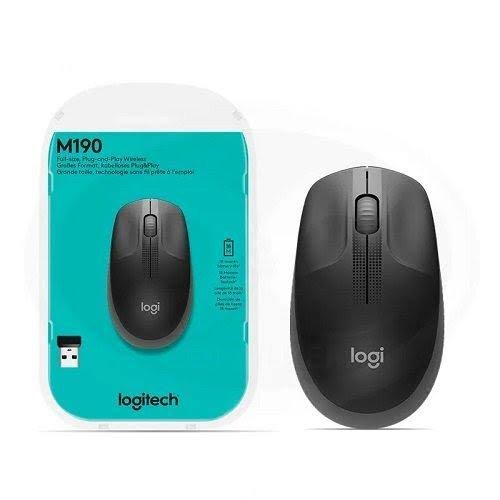
One of the main advantages of the Logitech M190 wireless mouse is its full-size, contoured shape. It is designed to follow the natural curve of medium to large hands, providing a more substantial feel than many small portable mice.
The shaped body and scooped buttons help position your fingers naturally during use. This design can make routine tasks such as clicking, scrolling, selecting files and navigating applications feel more comfortable.
The M190 is suitable for office desks, home workstations, study tables and reception counters where a mouse may be used regularly throughout the day. Its dimensions also give it a familiar, conventional mouse shape that many computer users prefer.
Comfort remains personal, so users with smaller hands should consider the dimensions before purchasing. However, if you prefer a full-size mouse that feels stable in your hand, the M190 is worth considering.
2. Reliable 2.4 GHz Wireless Connectivity
A wired mouse can create clutter around your workstation, particularly when your laptop or desktop is already connected to a charger, monitor, keyboard and other accessories.
The Logitech M190 removes the mouse cable from your desk. It uses a 2.4 GHz wireless connection through the included USB nano receiver, allowing you to control your computer without connecting a mouse cable.
The advertised wireless range is up to 10 metres under suitable conditions. This gives you flexibility to position your computer setup and use the mouse at a comfortable distance.
Wireless performance can vary depending on the surrounding environment, interference and the computer’s USB configuration. For typical home and office use, however, the M190 offers a convenient alternative to a wired mouse.
Remember that the Logitech M190 uses a USB receiver rather than Bluetooth. Your computer needs a compatible USB-A port, or an appropriate adapter if your device only has USB-C ports.
3. Long Battery Life for Less Interruption
Battery replacement is one of the practical considerations when choosing a wireless mouse. Logitech rates the M190 for up to 18 months of battery life, although actual results depend on usage and operating conditions.
The mouse uses one AA battery, which is included with the product according to Logitech’s published specifications. Its power-saving mode helps reduce energy consumption when the mouse is not being used.
For students, office employees and business owners, this can mean fewer interruptions compared with devices that require frequent battery changes or charging.
The M190 is not a rechargeable mouse. When the battery eventually runs out, you replace it with a compatible AA battery. This arrangement may suit users who prefer a simple battery-powered accessory without a charging cable or a dedicated charging routine.
4. Accurate Optical Tracking
The Logitech M190 uses optical tracking to translate hand movements into cursor movement on your screen. This is useful for everyday tasks such as opening applications, selecting text, working with spreadsheets, managing files and navigating websites.
Its 1,000 DPI-class tracking specification is suited to general productivity rather than specialised competitive gaming. For routine office work and browsing, this provides practical cursor control without unnecessary complexity.
The mouse is designed to work on a variety of common surfaces, although tracking performance may vary. A suitable mouse pad or clean, even desk surface can help maintain consistent movement.
If your work involves detailed graphic design, precision photo editing or competitive gaming, you may prefer a mouse with adjustable DPI settings and additional programmable controls. For general computer use, the M190 keeps things simple.
5. Easy Scrolling for Documents and Websites
The built-in scroll wheel makes it easier to move through long documents, web pages, spreadsheets and product listings.
Instead of repeatedly dragging the scrollbar, you can use the wheel to navigate through content. Logitech describes the M190’s scrolling as controlled, line-by-line scrolling, making it practical for everyday browsing and document work.
This is especially helpful for office users who frequently review reports, read online material or work with lengthy spreadsheets. Combined with the left and right buttons, the scroll wheel provides the basic controls most people need for regular computer use.
The M190 has three buttons, including the scroll-wheel button. It does not provide the extensive extra buttons found on some specialist gaming and productivity mice, but its simpler layout is easy to learn and use.
Logitech M190 Wireless Mouse Specifications
Before buying a computer accessory, it is important to understand its main technical specifications. The following details are based on Logitech’s published M190 product information.
| Feature | Specification |
|---|---|
| Product name | Logitech M190 Full-Size Wireless Mouse |
| Mouse type | Wireless optical mouse |
| Wireless technology | 2.4 GHz wireless |
| Connection | USB nano receiver |
| Bluetooth | Not supported |
| Sensor resolution | Approximately 1,000 DPI |
| Number of buttons | 3 |
| Scroll wheel | Line-by-line precision scrolling |
| Battery type | 1 × AA battery |
| Advertised battery life | Up to 18 months |
| Advertised wireless range | Up to 10 metres |
| Dimensions | 115.4 × 66.1 × 40.3 mm |
| Weight | Approximately 89.9 g with battery |
| Design | Full-size contoured shape |
| Compatible systems | Windows, macOS, ChromeOS and Linux, subject to system requirements |
| Primary uses | Office work, study, browsing and everyday computing |
Specifications can vary slightly by regional product listing or packaging. Check the product variant and included accessories before placing your order.
Who Should Buy the Logitech M190 Wireless Mouse?
The Logitech M190 is designed for users who need reliable everyday computer control without unnecessary features. Its full-size shape and wireless connection make it suitable for several different environments.
Office Workers and Professionals
If you spend much of your working day answering emails, preparing documents, updating spreadsheets or managing business software, a dependable mouse is an important workstation accessory.
The M190 offers a familiar button layout, a scroll wheel and wireless operation. Removing the mouse cable can also help keep a desk organised, especially when you share a workspace with other devices.
For administrative staff, accountants, customer support teams, receptionists and other office professionals, it is a practical choice for routine computing.
Students and Online Learners
Students regularly use computers to research assignments, access learning platforms, prepare presentations and participate in online classes. A wireless mouse can make these activities more convenient than relying exclusively on a laptop’s touchpad.
The Logitech M190 is simple to set up and does not require a complicated software installation for basic use. Connect its USB receiver, switch on the mouse and begin navigating your computer.
Its battery-powered design is also convenient for students who want to avoid charging another device every day.
Home Computer Users
A computer at home may be used for browsing, online shopping, personal finances, entertainment and communication. The M190 supports these everyday activities with simple, dependable controls.
Its wireless connection is particularly useful when you want fewer cables around your desk or home workstation. The full-size design may also feel more familiar than the small mice commonly supplied with compact travel accessories.
Small Businesses and Organisations
Businesses purchasing accessories for employees often need practical products that are straightforward to deploy and use.
The Logitech M190 is suitable for general-purpose office computers, reception desks, workstations and selected shared computer environments. Its USB receiver makes setup simple on compatible desktop computers and laptops.
For organisations buying several units, confirm current availability, pricing and any bulk-order arrangements with Mchoice Investments before ordering.
Remote Workers and Freelancers
Remote work often means switching between meetings, documents, email, browser tabs and project management tools. A reliable mouse helps make those everyday interactions easier.
The M190 is a useful option for freelancers, consultants, remote employees and home-based businesses that want a full-size wireless mouse without investing in a specialist model.
How to Set Up the Logitech M190 Wireless Mouse
Setting up the Logitech M190 is straightforward. For basic use, a separate mouse driver is generally not required on supported operating systems.
Follow these steps:
- Check the package. Confirm that the mouse and its AA battery are included.
- Prepare the battery. If the mouse has a protective battery tab, remove it according to the instructions.
- Locate the USB receiver. Open the battery compartment if necessary and remove the small wireless receiver.
- Connect the receiver. Insert it into an available compatible USB-A port on your laptop or desktop computer.
- Switch on the mouse. Use the power switch, if provided, and place the mouse on a suitable surface.
- Test the cursor. Move the mouse and check that the cursor responds on the screen.
- Begin working. Use the left and right buttons and scroll wheel as required.
If the mouse does not respond, check that the battery is installed correctly, the power switch is on and the receiver is firmly connected. You can also try another USB port and restart the computer if necessary.
For additional setup assistance, consult the official Logitech M190 setup and support guide.
Logitech M190 vs a Wired Mouse
Choosing between a wired and wireless mouse depends on your workstation and personal preferences.
A wired mouse connects directly to your computer and does not need a separate battery. It may be suitable for users who want a simple, permanently connected device.
The Logitech M190, on the other hand, provides wireless freedom and reduces cable clutter. You can move the mouse around your desk without worrying about the cable catching on other accessories.
The trade-off is that the M190 needs a compatible USB port for its receiver and an AA battery for power. You should also keep the small receiver safe when transporting the mouse.
If your priority is a cleaner desk and convenient wireless operation, the M190 is a sensible option. If you prefer not to manage batteries or wireless receivers, a wired mouse may be more suitable.
Logitech M190 vs a Compact Wireless Mouse
Compact wireless mice are designed for portability. They can fit easily into a laptop bag and may be convenient for frequent travellers or users who work in different locations.
The Logitech M190 prioritises a full-size shape. Its dimensions and contoured design make it a better option for people who prefer a larger mouse for everyday desk use.
Choose the M190 if you mainly work from a desk, use a desktop computer or prefer a more substantial mouse. Consider a compact model if saving bag space is your main concern.
Neither design is automatically better for everyone. Your hand size, working habits and preferred grip should guide your choice.
Tips for Getting the Best Experience from Your Logitech M190
A few simple habits can help you get more from your wireless mouse.
Use a suitable surface. A clean, even surface or mouse pad can support consistent optical tracking.
Keep the receiver secure. The nano receiver is small, so store it carefully when transporting the mouse.
Replace the battery when needed. If cursor movement becomes unreliable or the mouse stops responding, check the AA battery before assuming the device is faulty.
Keep the mouse clean. Remove dust and debris with a soft, dry cloth. Avoid pouring liquids onto the mouse or using harsh cleaning chemicals.
Choose a comfortable position. Place the mouse close to your keyboard and avoid stretching your arm repeatedly across the desk. A suitable desk height and relaxed wrist position can make everyday computer use more comfortable.
Check your USB connection. If the mouse disconnects intermittently, try a different USB port and consider whether nearby devices or wireless interference could be affecting performance.
These small steps can improve convenience and help you maintain a tidy, functional workstation.
Why Shop Computer Accessories at Mchoice Investments?
Mchoice Investments provides a range of technology products and computer accessories for customers in Kenya. Whether you are upgrading your personal workstation or equipping an office, you can explore products through the Mchoice Investments online store.
You can also browse the computer mouse category to explore available options and compare products. Product availability can change, so contact the team to confirm the Logitech M190’s current stock status, colour options and price.
Mchoice Investments lists its physical address as Midtown Business Centre, Taveta Road, Nairobi. For questions about the mouse, orders or delivery arrangements, contact the sales team before purchasing.
You may also explore other computer accessories available through the store to build a more complete workstation.
When ordering online, check the product details, payment information, delivery terms and applicable returns policy. If you are buying for a business, confirm whether the quantity you require is available before completing payment.
Frequently Asked Questions About the Logitech M190 Wireless Mouse
1. Is the Logitech M190 a wireless mouse?
Yes. The Logitech M190 is a wireless mouse that uses a 2.4 GHz connection through a USB nano receiver. It does not require a mouse cable during normal operation.
2. Does the Logitech M190 support Bluetooth?
No. The M190 uses its included USB wireless receiver rather than Bluetooth. Your computer needs a compatible USB-A port, or a suitable adapter if required.
3. How long does the Logitech M190 battery last?
Logitech advertises up to 18 months of battery life from one AA battery. Actual battery life depends on usage, environmental conditions and computer use.
4. Is the Logitech M190 rechargeable?
No. It uses a replaceable AA battery rather than an internal rechargeable battery. Replace the battery when necessary.
5. Is the Logitech M190 suitable for office work?
Yes. Its full-size design, optical tracking, three-button layout, scroll wheel and wireless connection make it suitable for general office tasks, including email, documents, spreadsheets and browsing.
6. Can I use the Logitech M190 with a laptop?
Yes. It can be used with a compatible laptop that has an available USB port for its receiver. If your laptop has only USB-C ports, you may need a compatible USB-C adapter or hub.
7. Does the Logitech M190 work with Mac computers?
Logitech lists compatibility with macOS, as well as supported Windows, ChromeOS and Linux systems. Check your operating system version and available ports before buying.
8. Is the Logitech M190 good for gaming?
The M190 can handle basic computer navigation and casual games. However, it is not a specialist gaming mouse and does not offer the advanced customisation, adjustable DPI controls or extra programmable buttons that some gamers prefer.
9. Is the Logitech M190 suitable for large hands?
The mouse is designed for medium to large hands and has a full-size contoured shape. However, comfort depends on your hand size and grip style, so consider the published dimensions before purchasing.
10. Where can I buy the Logitech M190 wireless mouse in Kenya?
You can check availability through Mchoice Investments. Contact the store to confirm the current price, colour, stock status and delivery options before placing your order.
Buy the Logitech M190 Wireless Mouse from Mchoice Investments
Make everyday computing more convenient with the Logitech M190 wireless mouse. Its full-size contoured design, dependable 2.4 GHz wireless connection, optical tracking and advertised battery life of up to 18 months make it a practical accessory for work, study and home use.
If you want a straightforward wireless mouse for your laptop or desktop computer, the Logitech M190 deserves consideration.
Ready to order? Visit Mchoice Investments or contact the team on +254 726 489 500 or sales@mchoice.co.ke to confirm availability and current pricing.
Choose a mouse that supports your everyday workflow and helps keep your workstation comfortable, organised and easy to use.